
Concurrent Collection in Java
In Synchronized Collection, a thread locks the entire list. Only one thread can access the entire list at a time. In Concurrent Collection, a thread locks only the required element, allowing different elements to be accessed by different threads concurrently.
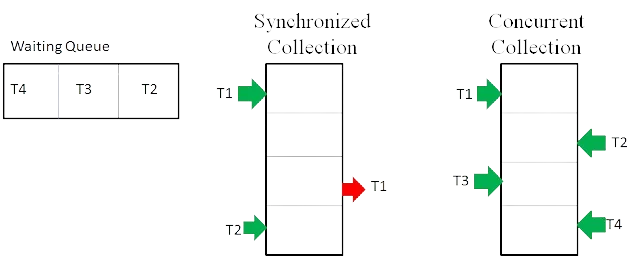
Java has supported multithreading and concurrency from its early versions. Java introduced Concurrent Collections in Java 5.0 and Java 6.0 as an improvement over synchronized collections to enhance performance in multithreaded environments. Java provides a Concurrent Collection API in addition to the traditional Collection API to handle multithreading and concurrency more efficiently. These interfaces and classes are available under the java.util.concurrent package.
In this article, we will focus on some key interfaces and classes of the java.util.concurrent package.
Synchronized Collection vs Concurrent Collection
Synchronized Collection:
- Synchronized Collections are slower in performance.
- Multiple threads can access a synchronized collection sequentially. Only one thread can access the collection at a time.
- Synchronized Collection locks the entire collection.
- Permits null values.
- Static synchronized methods of the Collections class are used to make a collection synchronized.
Concurrent Collection:
- Concurrent Collections provide better performance.
- Multiple threads can access a concurrent collection concurrently.
- Concurrent Collection does not lock the entire collection; instead, it uses more fine-grained concurrency mechanisms.
- Different operations can proceed concurrently depending on the collection implementation.
- Concurrent Collections generally do not permit null values.
Concurrent Collection Key Interfaces
| Interface | Details |
|---|---|
| BlockingDeque | A Deque that additionally supports blocking operations that wait for the deque to become non-empty when retrieving an element and wait for space to become available when storing an element. |
| BlockingQueue | A Queue that additionally supports operations that wait for the queue to become non-empty when retrieving an element and wait for space to become available when storing an element. |
| ConcurrentMap | A Map providing thread-safety and atomicity guarantees. |
| ConcurrentNavigableMap | A ConcurrentMap supporting NavigableMap operations and navigable sub-maps. |
| TransferQueue | A BlockingQueue in which producers may wait for consumers to receive elements. |
Concurrent Collection Classes
| Class | Description |
|---|---|
| ArrayBlockingQueue | A blocking queue class based on a bounded Java array. Once instantiated, it cannot be resized. |
| SynchronousQueue | A blocking queue in which each insert operation must wait for a corresponding remove operation by another thread, and vice versa. |
| LinkedBlockingQueue | An optionally bounded blocking queue based on linked nodes. |
| LinkedBlockingDeque | An optionally bounded blocking deque based on linked nodes. |
| LinkedTransferQueue | An implementation of TransferQueue. It is an unbounded TransferQueue based on linked nodes. |
| PriorityBlockingQueue | An unbounded blocking queue that uses the same ordering rules as PriorityQueue and provides blocking retrieval operations. |
| ConcurrentHashMap | A hash table supporting concurrent retrievals and high expected concurrency for updates. |
| ConcurrentSkipListMap | A scalable concurrent implementation of ConcurrentNavigableMap. |
Example
Synchronized HashMap Implementation
import java.util.Collections;
import java.util.HashMap;
import java.util.Map;
import java.util.concurrent.ConcurrentHashMap;

public class TestHashMap extends Thread {

    private static Map hm =
        Collections.synchronizedMap(new HashMap());

    public void run() {
        hm.put("Four", 4);
    }

    public static void main(String[] args) {

        hm.put("One", 1);
        hm.put("Two", 2);
        hm.put("Three", 3);

        TestHashMap t1 = new TestHashMap();
        t1.start();

        for (Object o : hm.entrySet()) {
            System.out.println(o);
        }

        System.out.println(hm);
    }
}
ConcurrentHashMap Implementation
import java.util.Collections;
import java.util.HashMap;
import java.util.Map;
import java.util.concurrent.ConcurrentHashMap;

public class TestHashMap extends Thread {

    private static ConcurrentHashMap hm =
        new ConcurrentHashMap();

    public void run() {
        hm.put("Four", 4);
    }

    public static void main(String[] args) {

        hm.put("One", 1);
        hm.put("Two", 2);
        hm.put("Three", 3);

        TestHashMap t1 = new TestHashMap();
        t1.start();

        for (Object o : hm.entrySet()) {
            System.out.println(o);
        }

        System.out.println(hm);
    }
}
Want to go deeper? Explore our Advanced Java course.
Transform Access To Education
Let's Try! Get This Free Support Solution?
Feel free to Call: (+91) 731 4249244