
Java Streams API - Process Set of Elements
A Stream is a series of objects. The source of a stream is an Array, Collection, or other I/O source. A Stream does not store data; it performs intermediate operations.
Streams can filter and manipulate the elements of their source. Streams are lazy, meaning the source and intermediate operations do nothing until objects are needed by the terminal operation.
The Streams API is contained in the java.util.stream package.
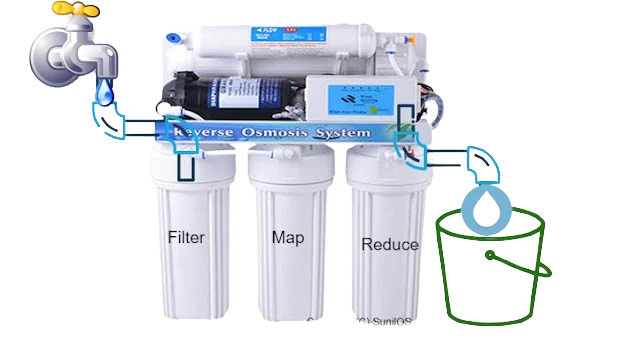
Streams
A water filter is a good example of streams. It processes the water stream through multiple filters, performing purification, reverse osmosis, and refinement, producing clean drinking water. The filter does not store water; it simply processes the water stream.
Getting Started
1. Create a Stream and Print All Elements
Let's create a stream from a collection and print all its elements. The following example creates a Stream from the list collection and prints all elements of the collection using its forEach method.
List<String> items = Arrays.asList(
    "One", "Two", "Three", "Three", "Four"
);

// Create stream
Stream<String> stream = items.stream();

// Print all elements from stream
stream.forEach(e -> {
    System.out.println(e);
});
2. Sort the Elements and Print
Stream elements can be sorted using sorted() method. The following example will create a stream, sort its elements using sorted() method, and then print all elements.
items.stream().sorted().forEach(e -> {
    System.out.println(e);
});
3. Convert Each Element to UPPER CASE and Print
Stream elements can be modified using map() method. The following example will create a stream, convert each element into the upper-case using its map() method, and then print all elements.
items.stream()
    .map(e -> e.toUpperCase())
    .forEach(e -> {
        System.out.println(e);
    });
4. Filter Elements Starting with 'T' and Print
Stream elements can be filtered using filter() method. The following example will filter elements starting with T character using filter() method, convert them into upper case, and then print all elements.
items.stream()
    .filter(e -> e.startsWith("T"))
    .map(e -> e.toUpperCase())
    .forEach(e -> {
        System.out.println(e);
    });
5. Remove Duplicate Elements
Stream can remove its duplicate elements using distinct() method. The following example will filter elements, remove duplicate elements, convert elements to upper case, then print all elements.
items.stream()
    .filter(e -> e.startsWith("T"))
    .distinct()
    .map(e -> e.toUpperCase())
    .forEach(e -> {
        System.out.println(e);
    });
6. All Together
The following example will filter elements, remove duplicate elements, convert them to upper case, sort elements, then print all elements.
items.stream()
    .filter(e -> e.startsWith("T"))
    .distinct()
    .map(e -> e.toUpperCase())
    .sorted()
    .forEach(e -> {
        System.out.println(e);
    });
7. Get Collection from Stream
You can get processed elements from Stream into a collection using collect() method.
List<String> l = items.stream()
    .filter(e -> e.startsWith("T"))
    .distinct()
    .map(e -> e.toUpperCase())
    .sorted()
    .collect(Collectors.toList());
Streams vs Collections
Stream and Collection look similar but there are major differences between both:
| Stream | Collection |
|---|---|
| Does not store data | Stores data |
| Read-only | Read and write |
| Can be read only once | Can be read multiple times |
| Elements cannot be directly accessed | Elements can be directly accessed |
Stream Sources
A stream can be created from arrays, collections, files, and other I/O sources.
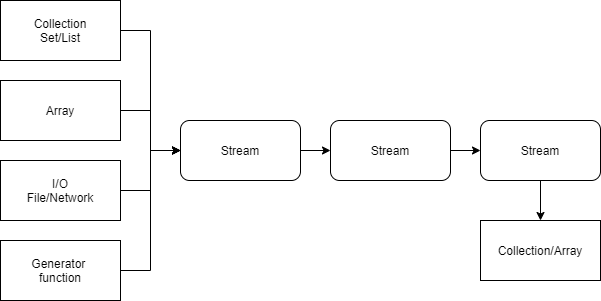
1. Collections/Arrays
List collection, Set collections, and arrays are the common sources of the stream. Map cannot be directly used as a source.
String[] a = {
    "One", "Two", "Three", "Four"
};

Stream<String> aStream = Arrays.stream(a);

List<String> l = Arrays.asList(
    "One", "Two", "Three", "Four"
);

Stream<String> lStream = l.stream();
2. I/O
Data from File and Network can be used as a source to the stream.
Stream<String> fileData =
    Files.lines(Path.of("data.txt"));
3. Generators
A Stream can be generated from a function that returns elements for the stream.
For example, in this example stream is created from random.nextInt() method. After creating stream we print 5 random numbers.
Random random = new Random();

Stream<Integer> randomNumbers =
    Stream.generate(random::nextInt);

randomNumbers
    .limit(5)
    .forEach(System.out::println);

Stream<Double> randomNumbers =
    Stream.generate(Math::random);
Operations

Intermediate Operations
An Intermediate Operation transforms one stream into another stream.
Stream methods filter(), map(), distinct(), sorted() etc., perform intermediate operations, and produce another stream.
List<String> items =
    Arrays.asList("One", "Two", "Three", "Three", "Four");

Stream<String> stream = items.stream();

items.stream().sorted();

items.stream().map(e -> e.toUpperCase());

items.stream().filter(e -> e.startsWith("T"));

items.stream().distinct();
Intermediate operations are:
- map() - It maps a function to a stream and changes elements of the stream.
- filter() - It filters elements of the stream.
- distinct() - It removes duplicate elements from the stream.
- sorted() - It sorts elements of the stream.
- limit() - It limits and returns the stream according to the given maxSize parameter.
- skip() - It skips the given N elements of the stream.
Chaining Intermediate Operations
Chaining makes Stream powerful. The output of one stream can be an input of another stream; it is called chaining.
You can chain multiple operations on a stream and produce the desired result using the least code.
For example, the following code applies chaining operations filter, distinct, map, sort, and finally prints all elements of stream in a single line of code.
items.stream()
    .filter(e -> e.startsWith("T"))
    .distinct()
    .map(e -> e.toUpperCase())
    .sorted();
Terminal Stream Operations
Streams are lazy, which means sources and intermediate operations do not do any work until a terminal operation is executed.
List<String> items =
    Arrays.asList("One", "Two", "Three", "Three", "Four");

Stream<String> stream = items.stream();

items.stream()
    .filter(e -> e.startsWith("T"))
    .distinct()
    .map(e -> e.toUpperCase())
    .sorted()
    .forEach(e -> {
        System.out.println(e);
    });
In the above example filter, distinct, map, and sorted intermediate operations will not be executed until the terminal operation forEach() method is called.
Terminal operations are:
- collect() - It converts a stream into a collection.
- toArray() - It converts a stream into an array.
- count() - It returns the count of the elements in the stream.
- reduce() - It reduces the elements of the stream according to the given identity value.
- min() - It returns the minimum element of the stream according to the given comparator.
- max() - It returns the maximum element of the stream according to the given comparator.
- anyMatch() - It returns true if any element matches the given predicate.
- allMatch() - It returns true if all elements match the given predicate. It returns true if the stream is empty.
- noneMatch() - It returns true if no elements match the given predicate. It returns true if the stream is empty.
- findAny() - It returns an Optional describing some element of the stream.
- findFirst() - It returns the first element of the stream.
Statistical Operations
You can perform max, min, average statistical operations on integer or double streams. Classes IntSummaryStatistics and DoubleSummaryStatistics are used to get integer and double value statistical operations. Methods mapToInt() and mapToDouble() are used to convert stream elements into integers or double values before applying the statistical operations.
The following example will apply statistical operations on marks and account balance:
List<Integer> marks =
    Arrays.asList(80, 90, 75, 50, 45, 95, 75);

IntSummaryStatistics mStats =
    marks.stream()
         .mapToInt(x -> x)
         .summaryStatistics();

System.out.println("## Marks statistics ##");
System.out.println("Max Marks: " + mStats.getMax());
System.out.println("Min Marks: " + mStats.getMin());
System.out.println("Average Marks: " + mStats.getAverage());
System.out.println("Sum : " + mStats.getSum());

List<Double> accountBalance =
    Arrays.asList(
        10000.89,
        20000.77,
        5000.66,
        5500.55,
        7000.88,
        30000.99,
        50000.00
    );

DoubleSummaryStatistics aStats =
    accountBalance.stream()
                  .mapToDouble(x -> x)
                  .summaryStatistics();

System.out.println("## Balance statistics ##");
System.out.println("Max Balance: " + aStats.getMax());
System.out.println("Min Balance: " + aStats.getMin());
System.out.println("Average Balance: " + aStats.getAverage());
System.out.println("Sum : " + aStats.getSum());
Real-World Example
Let's consider a Lucky Draw Contest where contestants send SMSs, and we select 3 random winners:
We will follow the following procedure to select 3 winners:
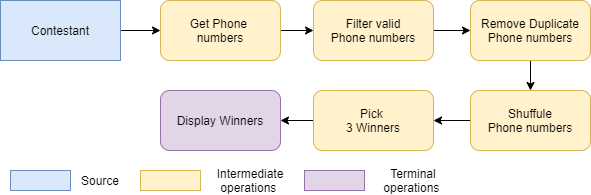
class Contestant {

    public String name = null;
    public String phone = null;

    public Contestant(String n, String p) {
        name = n;
        phone = p;
    }
}

ArrayList<Contestant> list =
    new ArrayList<Contestant>();

list.add(new Contestant("Ram", "9912345678"));
list.add(new Contestant("Shyam", "9912342222"));
list.add(new Contestant("Ajay", "9912345770"));
list.add(new Contestant("Vijay", "9912345678"));
list.add(new Contestant("Jay", "9912345888"));
list.add(new Contestant("Pappu", "9912345111"));
list.add(new Contestant("InvalidNO", "11"));
1. Get the phone numbers
list.stream()
    .map(e -> e.phone);
2. Get valid phone numbers
list.stream()
    .map(e -> e.phone)
    .filter(e -> e.length() == 10);
3. Remove duplicate phone numbers
list.stream()
    .map(e -> e.phone)
    .filter(e -> e.length() == 10)
    .distinct();
4. Shuffle Phone numbers
list.stream()
    .map(e -> e.phone)
    .filter(e -> e.length() == 10)
    .distinct()
    .collect(Collectors.collectingAndThen(
        Collectors.toList(),
        e -> {
            Collections.shuffle(e);
            return e.stream();
        }
    ));
5. Get 3 Winners
list.stream()
    .map(e -> e.phone)
    .filter(e -> e.length() == 10)
    .distinct()
    .collect(Collectors.collectingAndThen(
        Collectors.toList(),
        e -> {
            Collections.shuffle(e);
            return e.stream();
        }
    ))
    .limit(3);
6. Display winners
list.stream()
    .map(e -> e.phone)
    .filter(e -> e.length() == 10)
    .distinct()
    .collect(Collectors.collectingAndThen(
        Collectors.toList(),
        e -> {
            Collections.shuffle(e);
            return e.stream();
        }
    ))
    .limit(3)
    .forEach(e -> System.out.println(e));
WOW !!! Its very simple !!
Example Source Code
Find source code at GIT
Conclusion
Java Streams API is a powerful tool for processing collections of data with a clean, readable syntax. By using Streams, you can efficiently filter, map, and reduce data while leveraging modern programming practices.
Want to go deeper? Explore our Advanced Java course.
Transform Access To Education
Let's Try! Get This Free Support Solution?
Feel free to Call: (+91) 731 4249244